SENA NOTE turns plain text into decorated diary pages on Android
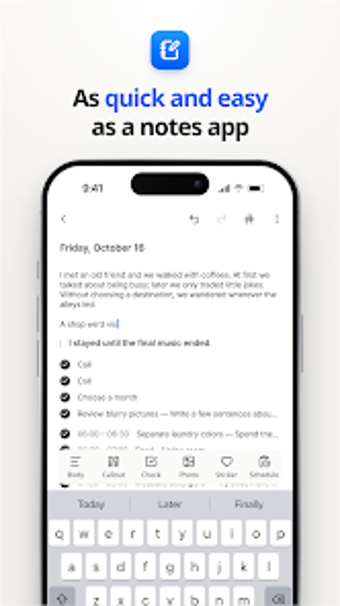
Converts plain text notes into formatted diary pages automatically, applying stickers, photo blocks and a single-tap aesthetic layout. SENA NOTE, developed by new friends house, is an Android productivity and lifestyle app that pairs a Dakkoo decoration system, Shuffle layout generator and XP rewards. It syncs entries in real time across logged-in devices, and targets students, creative writers and anyone who wants low-effort visual journaling without manual scrapbook work.
What does SENA NOTE do with a simple text note?
The app converts a basic notepad entry into a styled diary page by applying layout blocks, stickers and callouts automatically. It supports inserting photos into dedicated blocks, and the Shuffle button reorders decorations and layouts with one tap. The tool preserves the original text while producing an exportable diary-style page, so users who write freeform notes get a decorated result without manual layout steps.
Does the app affect device performance during synchronization?
Synchronization runs in real time across logged-in Android devices, which requires a stable internet connection for syncing and account management. The source material states the app delivers fast synchronization and compares its performance favorably to heavier PDF planners, implying lower runtime overhead during normal editing and sync operations on mobile hardware.
Is SENA NOTE safe to use on personal content?
Security and safety features include account-based synchronization that handles notes across devices; the app requires online connectivity for that feature. The input indicates no system-level file writes beyond sync and standard app storage, and it keeps original text intact while applying decorations, which preserves source entries rather than rewriting them destructively.
Do I need technical knowledge to get good results?
The app targets non-expert users by design: the Dakkoo decoration system, one-tap Shuffle and XP progression lower the learning curve. Users who prefer manual control can still customize layouts and stickers, but creative writers and students can rely on automatic formatting and gamified encouragement without technical setup or advanced configuration.
Who should use SENA NOTE and a practical tip
The app suits people who want visually styled journaling with minimal effort and who write regularly enough to benefit from XP rewards. For stable operations enable synchronization over a reliable network to keep entries consistent across devices. Recommended.